



Walk into almost any Australian SME using Zoho CRM, today and you will find the same pattern; Zoho is installed, CRM is running, invoices are being sent but the real power of the platform sits untouched. Most businesses treat Zoho CRM like a slightly better spreadsheet, not the fully connected, fully automated operating system it is built to be. The result is teams drowning in repetitive admin tasks, managers chasing information manually, sales follow-ups slipping through the cracks and leaders making decisions on incomplete data.
Meanwhile, Australian labour costs keep rising, skill shortages persist and every business is being asked to do more with the same headcount. Automation is not a nice to have anymore, it is the only way SMEs stay competitive. Yet most are paying for Zoho CRM but using barely 20% of its capability.
At FUZN, we have seen this pattern repeatedly across industries amongst Zoho users. The gap is not in the software, the gap is in how businesses use it.
What most businesses use in Zoho VS what Zoho actually offers
The typical Australian SME using Zoho leverages approximately just a few of the platform’s capabilities. Here is the breakdown:
What Most Businesses Use
- Zoho CRM for contact management and deal tracking
- Basic email integration
- Manual data entry and record updates
- Generic reporting dashboards
- Zoho Books for invoicing (often disconnected from CRM)
What is Actually Available
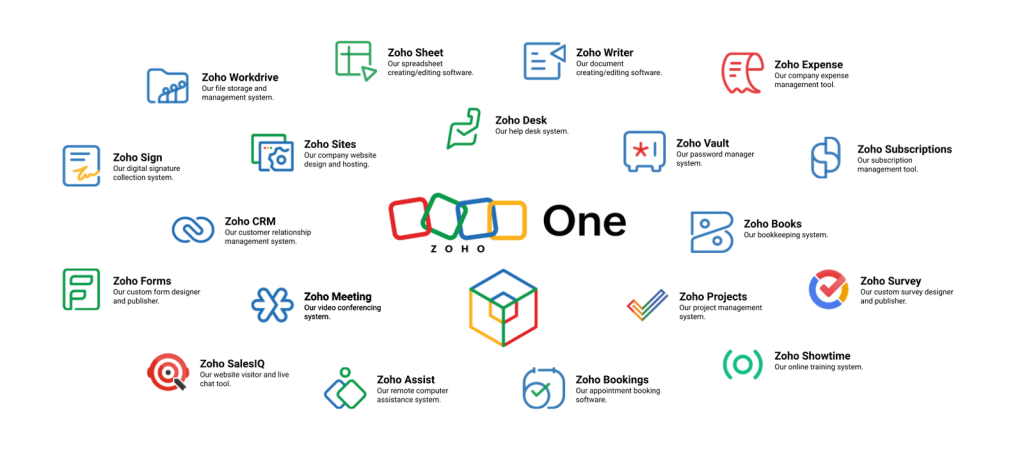
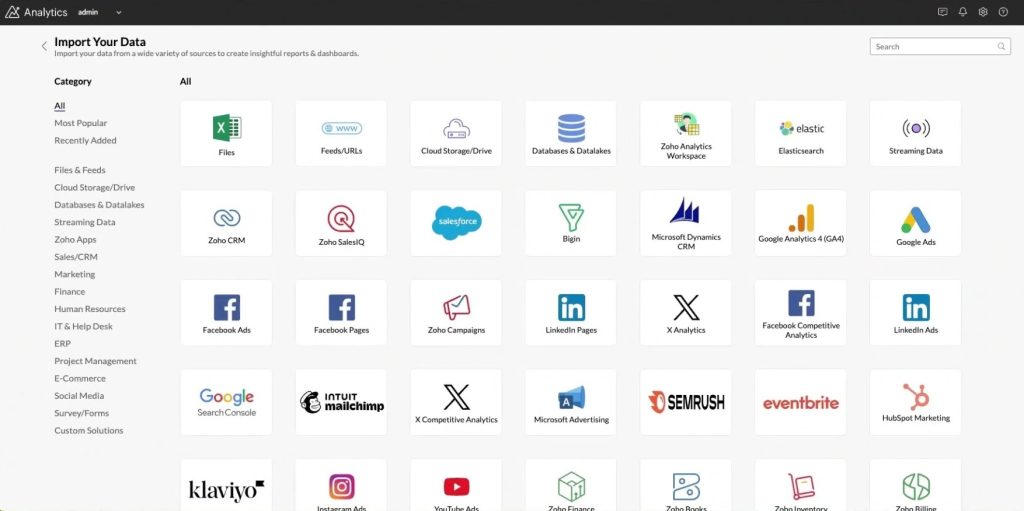
Zoho is not just a single application; it is an ecosystem of 40+ integrated tools designed to run your entire business. Beyond CRM, the platform includes:
Core Business Tools:
- Zoho Books: Full accounting suite with automated invoicing, expense tracking, inventory management and financial reporting
- Zoho Desk: Customer support ticketing system with SLA management, multichannel support and AI powered routing
- Zoho Inventory: Real time stock management, order fulfillment, warehouse tracking and supplier management
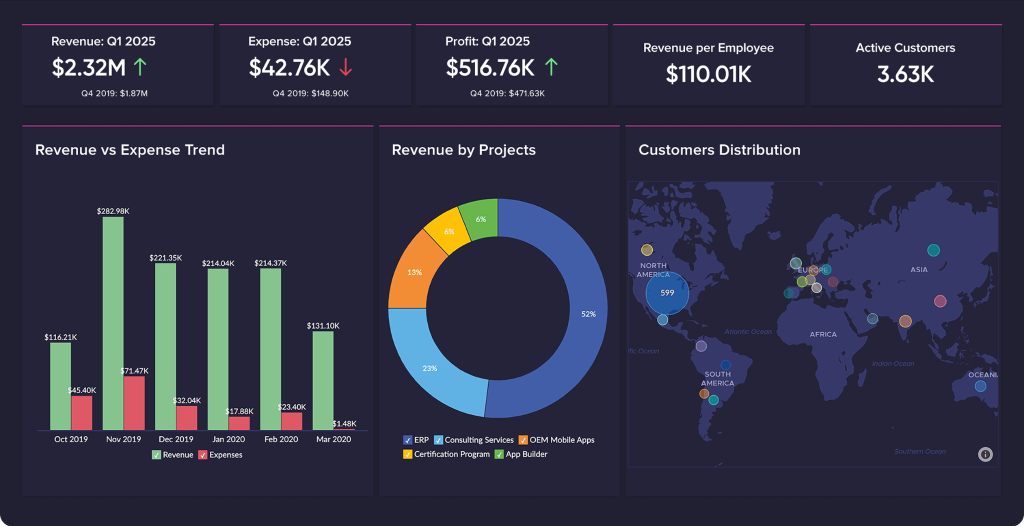
- Zoho Analytics: Advanced business intelligence with custom dashboards, predictive analytics and cross-app reporting
Lesser-Known Power Tools:
- Zoho Flow: Native workflow automation connecting Zoho apps and 500+ external services without coding
- Zoho Creator: Low code application builder for custom business solutions
- Zoho Campaigns: Email marketing automation with segmentation, A/B testing and journey mapping
- Zoho Forms: Advanced form builder with conditional logic, payment integration and workflow triggers
- Zoho Survey: Customer feedback collection with automated distribution and sentiment analysis
- Zoho People: HR management including leave tracking, attendance, performance reviews and onboarding workflows
- Zoho Projects: Project management with task automation, time tracking and resource allocation
- Blueprint: Visual process builder that enforces business workflows and approval hierarchies
- CommandCenter: Journey orchestration tool that coordinates complex multi application processes
Most businesses are unaware these tools exist, let alone how to integrate them into cohesive automated workflows. The gap between what businesses use and what they are paying for represents thousands of dollars in wasted subscription costs and tens of thousands in lost productivity annually.
The Zoho CRM Cost Advantage
To understand the value proposition, consider the entry-level pricing for comparable CRM platforms serving Australian SMEs:
| Platform | Per User (AUD/month) | 4 Person Team (AUD/month) | Included Features |
| Zoho CRM Standard | $22 | $88 | CRM, email integration, workflows, reports, mobile app |
| Zoho CRM + Books + Desk Bundle | $35.20 | $140.8 | CRM + full accounting + customer support + native integration |
| HubSpot Starter | $31 | $124 | CRM, basic email, forms, landing pages. (Additional users cost extra) |
| Salesforce Small Business | $35 | $140 | CRM, email integration, basic automation. (Separate costs for accounting, support desk) |
The pricing chart above reveals a critical insight; at comparable entry-level costs, Zoho CRM provides significantly more integrated tools than its competitors. Achieving the same functionality with HubSpot or Salesforce requires purchasing separate third-party tools (QuickBooks, Zendesk) and building custom integrations, often tripling the monthly cost and adding integration complexity.
 Top article todayExcel-to-App Evolution: Why the Transformation Matters for SME’s
Furthermore, Zoho One, the complete suite of 40+ applications, costs $60.50 AUD per user monthly at the time of writing. For a four-person team, this represents $242 monthly for tools that would cost $2,000+ monthly when assembled from separate vendors. Yet even businesses on Zoho One typically use only the CRM and Books, leaving 38 other applications untouched.
In a survey we conducted across our Australian SME clients, the biggest hesitation in moving from HubSpot or Salesforce to Zoho CRM is the fear of losing data, breaking existing workflows and having to retrain their team. Large enterprise clients have more hesitation migrating to Zoho CRM because it takes a whole year in new tool adoption due to the scale of their business. However once the migration to Zoho CRM is complete they reported a drop in lead response time from 35-50%, improved sales pipeline visibility by 40% and cost reduction of 30-60% annually.
Also Read: Beyond the Hype – A Practical Guide to Optimising AI Expenses
The question is not whether Zoho offers value, it is whether businesses are extracting that value. Most Australian SMEs are not.
Why Do Australian SMEs Only Use a Fraction of Zoho’s Power?
No Automation Strategy – Only Tool Adoption
Most businesses install Zoho but never design how their processes should run. Software without workflow design is like buying gym equipment but never creating a workout plan. Teams end up using Zoho just as a digital filing cabinet or glorified contact list. Automation becomes an afterthought, if it is even considered at all. The fundamental issue is treating Zoho as a database rather than a process engine. Businesses adopt the tools but fail to architect the workflows that connect those tools into automated sequences.
Staff Do Not Know What Zoho Can Actually Do
Zoho’s breadth actually also creates a discovery problem. Teams receive basic CRM training through Zoho video manuals and stop there, unaware that workflow automation, Blueprint process mapping, CommandCenter journey orchestration, Zoho Flow integrations, custom functions and API connectivity exist within their subscription. In every Zoho audit FUZN conducts, 80-90% of automation features are either untouched or incorrectly configured. Businesses do not realize they are sitting on tools that could eliminate hours of daily work because those tools were never introduced during implementation.
Too Many Apps, Not Enough Integration
Businesses adopt Zoho CRM, Books and perhaps Desk but they never connect them. The result is double data entry, mismatched information, multiple sources of truth and work lost in the gaps between systems. Sales closes a deal in Zoho CRM, finance manually re-enters the data into Zoho Books and support has no visibility into the customer’s purchase history in Zoho Desk. Zoho is designed to become an operating system but most SMEs still treat each app as an island. The integration layer where Zoho’s true power emerges remains unexplored.
Fear of Breaking Existing Processes
Teams primarily avoid automating because the system feels fragile. The concern is legitimate; poorly designed automation can create cascading failures. However, the solution is not avoiding automation but implementing it correctly. This requires understanding workflow logic, error handling and fallback procedures, expertise most internal teams lack. So everything stays manual ‘to be safe’, while the business continues bleeding time and money.
Extending Zoho Beyond Native Capabilities: n8n and Zapier
While Zoho Flow provides native automation between Zoho apps and external services, businesses often need more sophisticated workflow orchestration. This is where tools like n8n and Zapier become valuable extensions of the Zoho ecosystem.
What These Tools Do
n8n and Zapier are workflow automation platforms that connect different software applications, enabling data to flow automatically between systems without custom coding. They act as middleware, triggering actions in one application based on events in another. For example, when a deal closes in Zoho CRM, n8n can automatically create a project in Asana, send a Slack notification to the delivery team, generate a customer onboarding document in Google Docs and schedule a kickoff meeting in Calendly; all without human intervention.
 Read alsoHow to Build a 100% Custom AI with Your Organisational Data
Why They Matter for Zoho Users
While Zoho Flow handles many integrations, n8n and Zapier offer access to thousands of additional applications and more complex conditional logic. They are particularly useful for businesses that operate in hybrid software environments, using Zoho as their core but also relying on specialized tools like inventory systems, booking platforms or industry-specific software. Rather than forcing everything into Zoho or maintaining manual handoffs between systems, these workflow platforms create automated bridges.
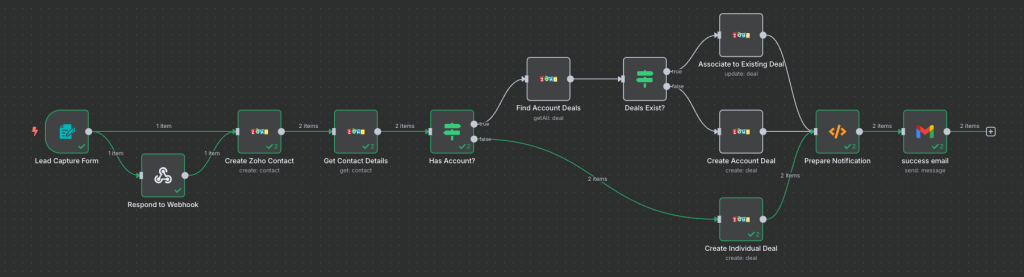
n8n offers particular advantages for businesses with technical resources, as it is self-hosted and provides unlimited workflow complexity. Zapier offers a user-friendly interface ideal for non-technical teams. Both extend Zoho’s automation capabilities significantly, transforming it from a closed ecosystem into a central hub that orchestrates your entire technology stack.
Also Read: n8n vs Zapier for Australian businesses
In our conversations with Australian business owners and decision makers, we found that over 70% of them only started getting significant business improvement once they started integrating Zoho’s internal automation tools or an external custom built automated workflows around their Zoho CRM . These Zoho clients mainly reported faster client onboarding, increase in sales follow-up and reduction in manual admin time as the key areas where they improved.
Where the 80% of Value Gap Lies
The unused 80% lies not entirely in hidden features of Zoho that teams are unaware of but also in the automated processes businesses could deploy today with Zoho tools but have not. Here is what’s sitting dormant:
Sales Automation:
- Lead scoring algorithms that prioritize high-value prospects automatically
- Multi-touch follow-up sequences triggered by prospect behavior
- Automated assignment of leads to sales reps based on territory or product expertise
- Quote-to-deal-to-invoice progression without manual handoffs
- Pipeline stage automation that triggers specific actions at each milestone
Properly configured sales automation typically increases conversion rates by 20-40%.
Finance and Billing Automation:
- Invoice generation triggered automatically when deals close in CRM
- Payment reminder sequences that escalate based on invoice age
- Expense approval workflows that route based on amount and category
- Subscription billing that handles recurring charges and auto-renewals
- Bank reconciliation that matches payments to open invoices
- Financial reporting that updates in real-time across all revenue streams
This eliminates virtually all manual financial administration.
Get the best ones in your inbox — no spam, unsubscribe any time.
Customer Support Automation:
- Intelligent ticket routing based on issue type, customer value, or agent expertise
- SLA (Service Level Agreement) tracking with automatic escalation when response times breach thresholds
- Sentiment analysis that flags frustrated customers for priority handling
- Automated responses for common issues with knowledge base article suggestions
- Post-resolution satisfaction surveys, automatically distributed and tracked
Your business support mechanics need to be consistent, predictable and scalable, helping to improve your service. Good service is key in any industry.
Operations and Approvals:
- Leave request workflows that route to appropriate managers based on organizational hierarchy
- Purchase order approvals with multi-level sign-off based on dollar thresholds
- Document handover sequences that ensure deliverables move between teams with proper context
- Onboarding workflows that create accounts, assign training and schedule check-ins automatically
- Compliance tracking that alerts when certifications, licenses or mandatory documents approach expiration
Most SMEs waste 5-15 hours weekly on manual approval chasing alone.
Cross-App Data Synchronization:
This is where the compound value emerges. When your Zoho CRM talks to other Zoho tools like Books, Inventory, Desk, Marketing Automation and Analytics, Zoho transforms from scattered applications into a unified operating system. Customer purchases in Zoho CRM automatically update inventory levels, trigger fulfillment workflows in Zoho Projects, create support entitlements in Zoho Desk and update customer lifetime value dashboards in Zoho Analytics; all without human intervention. In doing so your business gains a single source of truth and real-time operational visibility.
Automated Zoho Workflows in Action
Real Estate Agency: End-to-End Lead Management
Problem: A Perth-based real estate agency generated strong leads but suffered from chaotic follow up. Agents manually sorted inquiries each morning, trying to match properties to prospects. Response times averaged 4-6 hours and high-value buyers often did not receive timely information.
FUZN’s Solution: We built an automated workflow connecting Zoho CRM, Zoho Campaigns and n8n for external integrations. Website and Facebook leads flow automatically into Zoho CRM with property preferences tagged. Smart matching rules pair lead preferences with current listings and send personalized property portfolios within minutes. Leads are assigned to local area specialists based on location. Automated SMS and email sequences handle property viewing scheduling, financing information delivery and inspection reminders. The entire journey from inquiry to contract signing is tracked and orchestrated through Blueprint workflows.
Impact: Response times dropped from hours to under 5 minutes. Agent productivity increased 40% as they stopped manually sorting leads. Conversion rates improved 28% in the first quarter because no lead fell through the cracks.
NDIS Provider: Scaling Operations Without Headcount Growth
Problem: A Melbourne NDIS (National Disability Insurance Scheme) care provider grew rapidly through social media but their backend could not keep pace. Participant inquiries required manual data entry into multiple systems. Compliance tracking lived in spreadsheets. Billing was a monthly ordeal. Client satisfaction surveys were sporadic and management reporting was always weeks behind.
FUZN’s Solution: We created an integrated workflow across Zoho CRM, Forms, Books, Survey and Analytics with Zapier handling social media integrations. Social media leads automatically populate Zoho CRM with source tracking. Initial qualification forms trigger customized follow-up sequences based on service type. Blueprint workflows enforce NDIS compliance requirements with automatic alerts for missing documentation. Zoho Books generates invoices automatically based on service delivery logged in the CRM, formatted to NDIS standards. Post-service satisfaction surveys distribute automatically via Zoho Survey, with responses feeding back into participant records. Customised Analytics dashboards provide real-time visibility into participant numbers, service delivery, billing status and satisfaction scores.
 Read alsoDitch the Generic, NOW! Build AI‑Powered Micro-SaaS That Fit Your Business, Fast.
Impact: Administrative time decreased by 35 hours weekly. The provider scaled from 45 to 78 active participants without adding admin staff. Compliance became bulletproof through automated verification. Monthly reporting that once required a week now updates in real-time.
E-Commerce Brand: Integrated Sales and Support
Problem: A Brisbane outdoor gear e-commerce brand faced fragmented sales processes and overwhelmed customer support. Shopify handled orders but inventory, customer data and forecasting were disconnected. Support was buried in repetitive questions about order status, returns and product availability, leading to 24-hour response times.
FUZN’s Solution: We connected Zoho Inventory, CRM, Desk and Analytics with n8n orchestrating the Shopify integration. Inventory syncs in real-time with Shopify and feeds into Zoho CRM, giving sales teams immediate stock visibility with automatic reorder alerts. Zoho Desk creates tickets automatically from email, chat and social media, with AI-powered routing by inquiry type. Common questions trigger automated responses with order tracking links and return forms, while complex issues escalate to senior support with full customer context. Customised Analytics dashboards, we developed display real-time product performance, customer lifetime value and inventory trends.
Impact: Support response times dropped from 24 hours to under 2 hours. Automated responses handled 60% of routine inquiries without human intervention. Sales forecasting became accurate through unified visibility across inventory, orders and customer behavior.
Also Read: AI Automations your organisation can deploy today
How to Close the Zoho Automation Gap
The challenge is not in Zoho’s capabilities, it is knowing how to design, connect and optimize the system for your specific business operations. Most business owners struggle with understanding which Zoho applications their processes actually require, designing workflows that match operational reality rather than forcing processes to fit software defaults, integrating multiple applications without breaking existing systems and configuring automation that genuinely saves time rather than creating new problems.
As an official Zoho partner and also an automation workflow builder, FUZN specializes in unlocking the full potential of the Zoho ecosystem for Australian SMEs. We do not simply just install Zoho:
- We audit current systems to identify where time, money and data leak
- Design automated workflows across sales, finance, operations and customer success
- Build integrated solutions that scale as businesses grow.
Where Zoho’s native capabilities need extension, we deploy workflow automation platforms like n8n and Zapier to create sophisticated orchestration across your entire technology stack. The businesses that close the automation gap reduce operational costs, accelerate workflows, strengthen customer experience, improve decision-making visibility and grow faster without proportional headcount increases. This helps you own a business operating system without breaking the bank.
Our audits found that the average SME’s uses 3-6 different apps across marketing, sales, finance, advertising and service; yet 90% businesses do not integrate it with their Zoho CRM which results in duplicated data, errors in quoting, invoicing and follow-ups and loss of leads due to lack of workflow errors.
Make Use Of The Subscription You Are Already Paying
Most Australian SMEs do not need more software. They need to use what they already have properly. Zoho is far more than a CRM, it is a fully capable operating system when your workflow is configured and automation is activated. The 80% gap represents not just unused features but unrealized efficiency, lost revenue and competitive disadvantage.
The question every business should ask is: “What are we still doing manually that Zoho should be doing for us?”
If you are ready to unlock the full value of your Zoho investment and close the automation gap, FUZN can show you what is possible. Turn your Zoho subscription into the competitive advantage it is designed to be.