





AI and Product design has both undergone a seismic transformation in 2025, fundamentally changing how designers create, iterate and deliver solutions. What was once a linear, time-intensive process requiring extensive cross-functional teams has evolved into a dynamic, AI-enhanced workflow that compresses timelines from months to weeks and sometimes even days.
The numbers tell a compelling story: 93% of web designers already use AI in design-related tasks, whilst 57% believe AI and machine learning will soon become essential design tools. The global generative AI in design market, valued at $412 million in 2022, is projected to reach $7.7 billion by 2032, a testament to the technology’s transformative potential.
For businesses looking to stay competitive, understanding AI’s role in product design is not optional; it is essential.
What Is Product Design?
Defining the Discipline
Product design is the strategic process of creating products that solve specific user problems whilst meeting business objectives. It encompasses everything from initial concept development and user research to visual design, prototyping and testing. Unlike traditional graphic or visual design, product design takes a holistic approach, considering not just how something looks, but how it functions, how users interact with it and how it fits into broader business goals.
Modern product design operates at the intersection of multiple disciplines:
User Experience (UX) Design: Understanding user needs, behaviours and pain points through research and testing.
User Interface (UI) Design: Creating the visual and interactive elements that users directly engage with.
Interaction Design: Defining how users navigate and interact with digital products.
Visual Design: Establishing aesthetics, typography, colour schemes and overall visual hierarchy.
Strategic Thinking: Aligning design decisions with business objectives and market needs.
The Traditional Product Design Process
The conventional product design process typically follows a structured approach:
- Research and Discovery: Understanding user needs, market requirements and business constraints
- Ideation and Concept Development: Brainstorming solutions and exploring different approaches
- Prototyping: Creating testable versions of design concepts
- Testing and Validation: Gathering user feedback and iterating based on insights
- Implementation: Working with development teams to bring designs to life
- Launch and Optimisation: Monitoring performance and making improvements
This process, whilst thorough, has traditionally been time-consuming and resource-intensive. Teams would spend weeks gathering requirements, creating detailed wireframes, building prototypes and conducting multiple rounds of testing before reaching a final solution.
How Has AI Changed Product Design?
The Acceleration Revolution
AI has fundamentally altered the pace and nature of product design. Where traditional workflows once required quarters or even years, AI-powered tools now enable functional prototypes within days or even hours. This dramatic acceleration stems from AI’s ability to automate routine tasks, generate variations at scale, and provide instant feedback on design decisions.
According to recent data, AI-assisted development teams can achieve productivity improvements of 25-40% in specific workflows. Companies implementing advanced AI in product design anticipate achieving three times the ROI compared to those with minimal AI integration.
Key Areas of Transformation
Design Automation: AI handles repetitive tasks such as layout adjustments, colour recommendations, and component generation, allowing designers to focus on strategic thinking and creativity.
Enhanced Research Capabilities: AI can analyse vast amounts of user data, identify patterns in behaviour, and provide insights that would take human researchers significantly longer to uncover.
 Top article todayExcel-to-App Evolution: Why the Transformation Matters for SME’s
Rapid Prototyping: Tools can generate multiple design variations from simple prompts, enabling designers to explore more possibilities in less time.
Real-time Feedback: AI provides immediate analysis of design decisions, helping teams identify potential issues before they become problems.
Where AI Helps Most
AI’s impact is particularly pronounced in several key areas:
Ideation and Brainstorming: AI tools generate design concepts, mood boards, and creative directions, helping teams explore new possibilities and break through creative blocks.
Data Analysis and Insights: Processing user feedback, analytics data, and research findings to identify patterns and opportunities.
Workflow Optimisation: Automating handoffs between design and development, maintaining design systems, and ensuring consistency across products.
Personalisation at Scale: Creating tailored experiences for different user segments without manually designing each variation.
If you want to turn the AI opportunities outlined here into products customers actually want, a practical next step is to map those capabilities against market demand. Our guide Product-Market Fit in the AI Economy explores how AI changes what customers expect and which hypotheses you should test first.
AI Capabilities Product Designers Can Leverage
Text-to-Design Generation
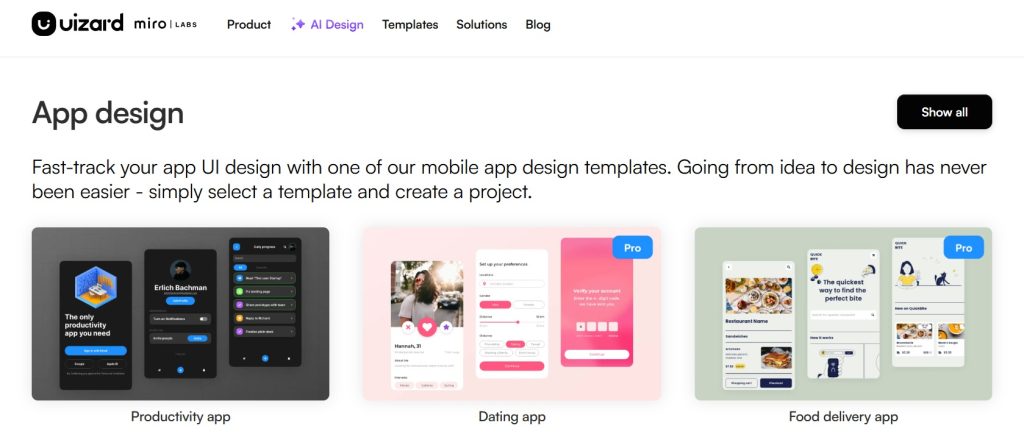
Modern AI tools can transform written descriptions into visual designs. Platforms like Uizard and Galileo AI convert text prompts into functional UI wireframes and complete layouts. This capability allows designers to quickly explore multiple concepts without starting from scratch each time.
Practical Applications:
- Converting feature requirements into initial wireframes
- Generating multiple layout options from a single brief
- Creating design variations for A/B testing
Intelligent Design Assistance
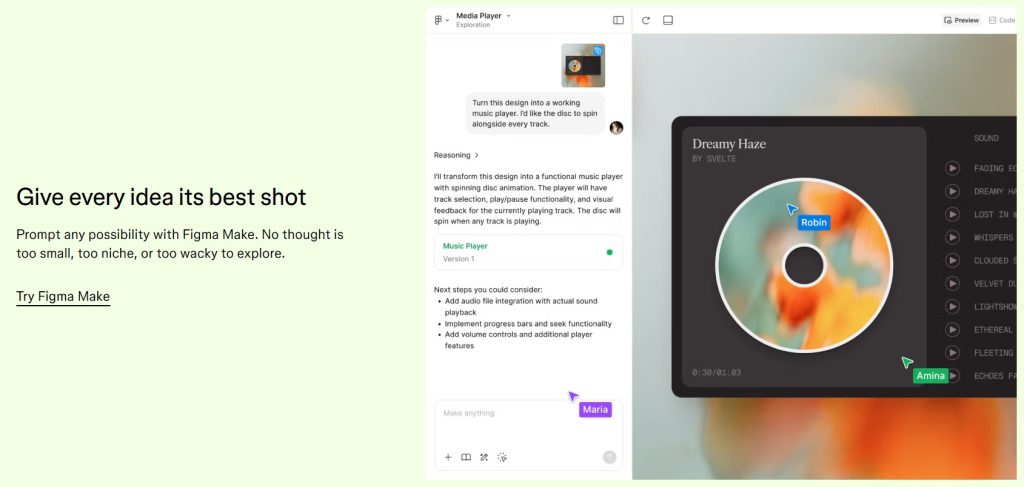
AI-powered design assistants integrate directly into existing tools like Figma, providing contextual suggestions and automating routine tasks.
Examples of Intelligent Assistance:
- Smart Layout Suggestions: AI analyses content and suggests optimal layouts
- Component Generation: Automatically creating design system components based on patterns
- Accessibility Checking: Real-time feedback on colour contrast, typography and usability issues
- Design System Maintenance: Ensuring consistency across products and platforms
Advanced Research and Analytics
AI transforms how designers gather and interpret user insights:
Behavioural Analysis: AI processes user interaction data to identify patterns, pain points, and opportunities for improvement.
Sentiment Analysis: Understanding user emotions and reactions from feedback, reviews, and social media mentions.
Predictive Modelling: Anticipating user needs and behaviours based on historical data.
Automated User Testing: AI can simulate user interactions and provide initial feedback before conducting human testing.
Content Generation and Optimisation
AI assists with creating and refining design content:
Copy Generation: Writing user interface copy, product descriptions, and microcopy that matches brand voice.
Image and Icon Creation: Generating custom illustrations, icons, and visual elements.
 Read alsoMarketing Powered by AI: The Best AI Models for Every Role in 2025
Localisation: Adapting designs and content for different markets and languages.
Design System Intelligence
AI enhances design systems by:
Pattern Recognition: Identifying inconsistencies and suggesting improvements across design libraries.
Automated Documentation: Generating design guidelines and component documentation.
Usage Analytics: Tracking how design components are used and suggesting optimisations.
How Companies Are Revolutionising Product Design Processes
Streamlined Workflows and Faster Iteration
Companies are implementing AI to compress traditional design cycles dramatically. For example, teams that once required weeks to move from concept to testable prototype can now achieve the same results in days.
Real-World Applications:
- Rapid A/B Testing: Generating multiple design variations for testing without manual creation
- Automated Asset Generation: Creating marketing materials, social media assets and product imagery at scale
- Dynamic Personalisation: Adapting interfaces in real-time based on user behaviour and preferences
Enhanced Collaboration Between Design and Development
AI is bridging the traditional gap between design and development teams:
Code Generation from Designs: Tools that convert Figma designs into working code, reducing handoff friction.
Component Synchronisation: Ensuring design systems remain aligned between design tools and development repositories.
Automated Quality Assurance: AI checking for design implementation accuracy and flagging discrepancies.
Data-Driven Design Decisions
Companies leverage AI to make more informed design choices:
Predictive User Experience: Anticipating how design changes will impact user behaviour and business metrics.
Performance Optimisation: AI analyses page load times, interaction patterns, and user engagement to suggest improvements.
Get the best ones in your inbox — no spam, unsubscribe any time.
Market Trend Analysis: Understanding design trends and user preferences across industries and demographics.
Case Studies in Implementation
Startup Acceleration: Product startups use AI tools like Ideate to validate ideas visually without needing full render pipelines, enabling faster market validation and investor presentations.
Enterprise Scale: Large corporations implement AI to maintain consistency across multiple products whilst accelerating innovation cycles.
E-commerce Innovation: Online retailers use AI for personalised product recommendations, dynamic pricing displays, and customised shopping experiences.
AI Tools for Product Designers in 2025
Comprehensive Design Platforms
Figma with AI Plugins
- Capabilities: Smart layout suggestions, component generation, content creation
- Best For: Teams already using Figma who want to enhance existing workflows
- Pricing: Free plan with community plugins; Professional at £12/editor/month
UXPin Merge with AI Component Creator
- Capabilities: Code-based component integration, automated UI generation
- Best For: Teams wanting to bridge design-development gaps
- Unique Feature: Creates functional components, not just visual mockups
Ideation and Brainstorming Tools
ChatGPT
- Applications: User persona creation, copy generation, research synthesis
- Pricing: Free tier available; Plus at £20/month
- Strengths: Versatile text generation and analysis capabilities
Claude
- Applications: Complex research analysis, detailed user journey mapping
- Pricing: Free access via Poe; Pro ~£20/month
- Strengths: Nuanced understanding and comprehensive responses
Miro AI
- Applications: Brainstorming, sticky note clustering, workflow mapping
- Pricing: Free plan available; Business at £16/month per member
- Strengths: Real-time collaboration with AI-powered organisation
Visual Design and Asset Creation
Midjourney
- Applications: Mood boards, concept visualisation, design inspiration
- Pricing: Basic £10/month; Pro £60/month
- Strengths: High-quality, stylised visual generation
Adobe Firefly
- Applications: Background replacement, asset variation, visual iteration
- Pricing: Included with Creative Cloud subscriptions
- Integration: Seamless workflow with existing Adobe tools
Ideate AI by Imagine.art
- Applications: Product sketching, rendering, design variations
- Strengths: Specialised for product design workflows
- Features: Sketch-to-render capabilities, material swapping, style transfer
Research and Testing Tools
Maze with AI
- Applications: Automated usability testing, insight generation, bias detection
- Features: AI-powered research question generation, sentiment analysis
- Integration: Comprehensive UX research platform with built-in participant recruitment
Dovetail
- Applications: Research synthesis, interview analysis, insight extraction
- Features: Magic Highlight for key moments, automated transcription and tagging
- Pricing: Free tier; Professional at £39/month per user
Specialised Product Design Tools
V0 by Vercel
- Applications: Rapid prototyping, web interface generation
- Strengths: Code output for functional prototypes
Framer AI
- Applications: Interactive website creation with animations
- Best For: Marketing sites and landing pages with dynamic elements
Galileo AI
 Read alsoHybrid Work and AI: Why Most Companies are Getting it Wrong
- Applications: High-fidelity UI generation from text prompts
- Strengths: Quick concept-to-design workflows
No-Code and Low-Code Solutions
Webflow AI
- Applications: Web layout generation and design suggestions
- Integration: Direct publishing and hosting capabilities
FlutterFlow AI
- Applications: Native mobile app generation with AI logic
- Best For: Mobile-first product development
Emerging and Specialised Tools
- Application: Personalised colour palette generation
- Pricing: Free
- Unique: Learns from your preferences to create custom colour schemes
Perplexity
- Applications: Competitive research, trend analysis, quick insights
- Pricing: Free plan; Pro at £20/month
- Strengths: Contextual search with source citations
Integration Strategies and Best Practices
Starting Your AI Integration Journey
Phase 1: Foundation Building
- Assess Current Workflows: Identify time-consuming, repetitive tasks that could benefit from automation
- Team Preparation: Train team members on AI collaboration and tool usage
- Tool Selection: Start with one or two tools that address your biggest pain points
Phase 2: Pilot Implementation
- Focused Testing: Begin with specific, well-defined use cases
- Measure Impact: Track productivity gains, quality improvements, and user satisfaction
- Iterate and Refine: Use learnings to optimise AI tool usage and expand capabilities
Phase 3: Scale and Optimise
- Workflow Redesign: Reimagine processes with AI at the core rather than as an add-on
- Cross-functional Integration: Expand AI tools across departments and functions
- Continuous Improvement: Regular review and enhancement of AI-powered workflows
Measuring Success
Efficiency Metrics:
- Time saved on routine tasks
- Faster iteration cycles
- Reduced design-to-development handoff time
Quality Indicators:
- Design consistency across products
- User experience improvements
- Reduction in post-launch revisions
Innovation Measures:
- Number of concepts explored per project
- Speed of market validation
- Frequency of breakthrough ideas
The Future of AI in Product Design
Emerging Trends and Capabilities
AI Agents for Design: Autonomous systems that can complete entire design workflows, from research to final implementation.
Hyper-Personalisation: AI creating individualised experiences for each user based on real-time behaviour analysis.
Predictive Design: Systems that anticipate user needs and suggest design improvements before problems arise.
Cross-Platform Intelligence: AI that ensures consistent experiences across all touchpoints and devices.
Preparing for Tomorrow
As AI capabilities continue to evolve, successful product designers will be those who learn to work alongside intelligent systems. This means developing skills in:
AI Collaboration: Understanding how to effectively prompt, guide, and refine AI outputs.
Strategic Thinking: Focusing on high-level problem-solving whilst AI handles routine execution.
Ethical Design: Ensuring AI-powered products are inclusive, accessible, and respect user privacy.
Continuous Learning: Staying current with rapidly evolving tools and methodologies.
AI and Product Design for 2025: Conclusion
AI has fundamentally transformed product design from a craft-based discipline to a technology-enhanced practice that combines human creativity with machine efficiency. The tools available in 2025 enable designers to work faster, explore more possibilities, and create better user experiences than ever before.
However, success with AI in product design is not about replacing human creativity, it is about amplifying it. The most effective design teams are those that view AI as a collaborative partner, using its capabilities to handle routine tasks whilst focusing their human expertise on strategy, empathy and innovation.
For businesses looking to stay competitive in this rapidly evolving landscape, the question is not whether to adopt AI in product design, it is how quickly and effectively you can integrate these powerful tools into your workflows.
The future belongs to teams that can seamlessly blend human insight with artificial intelligence, creating products that are not only more efficient to develop but also more responsive to user needs. The time to begin this transformation is now.
Ready to revolutionise your product design process with AI? Get in touch with Fuzn today to explore how AI integration and development can transform your design workflows and accelerate your product development.